Home V App Download for Android (Latest Version)
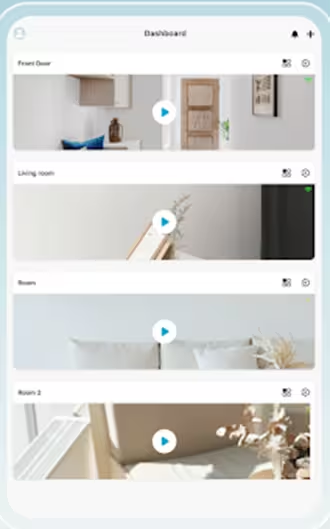
If you need the Home V app, you can download it right here. A direct link is provided below, and it is the official app, which we have securely brought to you. You can download it by clicking the button below. This app basically connects your home CCTV cameras to your mobile phone, and it comes packed with advanced features that we will discuss one by one below.
Home V App Download Apk
| Features | Details |
|---|---|
| Application Name | Home V |
| latest Version | 4.9.0.21 |
| Updated On | May 20, 2026 |
| Released On | Apr 1, 2022 |
| Developer | Puwell Technology Inc |
| Requires Android | Android 7.0 and up |
| File Size | 158 MB |
| Downloads | 100,000+ downloads |
| Content Rating | Rated for 3+ |
| Permissions | Camera, Storage, Network, Notifications |
| App Category | CCTV Camera Monitoring App |
| Main Features | Live View, Playback, Motion Alerts, Cloud Storage, Remote Monitoring. |
What is Home V App?
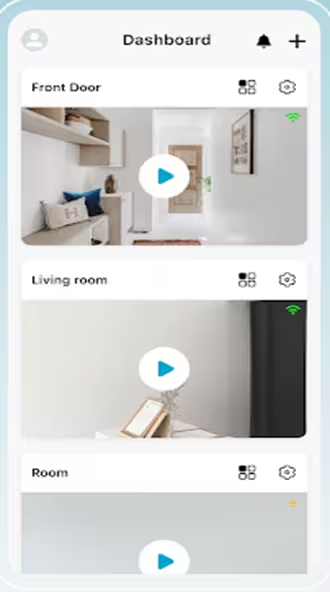
As I mentioned above, this is a CCTV monitoring application that you can install on your Android phone or tablet. In addition to live CCTV monitoring, you can also check your security camera recordings. You can organize your cameras by the area of your home. Plus, since it’s a cloud-based application, you can even connect it to your smart devices, like wearables and Alexa.
The Home V app is specially designed for home security, and it includes several features that let you easily keep a close eye on your baby or pets.
Main Features of Home V App
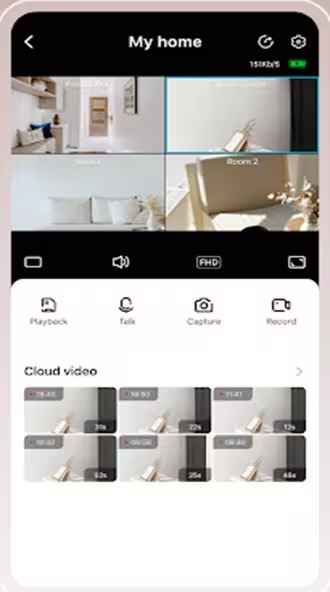
- Live video streaming for real-time CCTV monitoring: This is the most obvious feature: live CCTV monitoring using the internet. Just connect your cameras to the app and enjoy access to your CCTV feed from anywhere in the world.
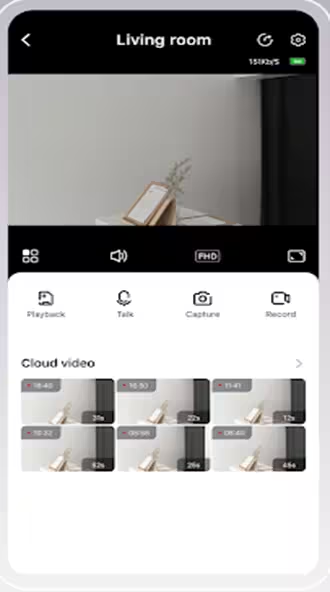
- Two-way communication to talk through supported cameras: This application features two-way audio, allowing you to press the mic button on your phone to talk through the camera’s speaker. At the same time, any audio captured by the camera will play directly on your mobile device.
- Playback support for recorded video footage: As I mentioned earlier, you can play back the recordings captured by your cameras. You can also fast-forward through the footage and more.
- Instant motion detection alerts and notifications: If you have motion detection enabled on your cameras, you can receive alerts on your phone via notifications. This means the moment the camera detects any movement, your phone will instantly send you a notification alert.
- Alexa support for voice control integration: This is easily the best feature of the app. It allows you to connect your cameras to Alexa so you can control them using just your voice.
- Wear OS support for smartwatch access: You can also easily run this app on your smartwatch and other devices. The app fully supports them.
- Pet Call feature on supported devices: It also includes a feature to communicate with your pets. However, I haven’t tested this feature myself since I don’t have any pets.
- Barking Detection feature on select cameras: You can also enable a barking detection feature on any of your cameras. This means whenever your pet starts making noise or barking, you’ll get an instant notification.
Permission Required to Run Home V App
Here is the natural, human-written US English translation. It sounds like an honest, helpful reviewer explaining app permissions clearly:
When you install this app on your phone or tablet, it will ask for a few permissions, such as access to your phone’s microphone. I checked the details on the Play Store and listed them here in a simple format so you can see exactly what permissions are required to run the app.
| Permission Category | Purpose |
|---|---|
| Device & App History | Used for improving app stability and monitoring performance logs |
| Identity & Accounts | Helps detect accounts on the device for login and synchronization features |
| Contacts Access | May be used for account-related features and device sharing options |
| Location Access | Required for Wi-Fi camera setup, nearby device detection, and accurate network configuration |
| Phone Information | Helps identify device status and maintain stable connectivity |
| Photos, Media & Files | Allows saving screenshots, recordings, playback files, and accessing stored media |
| Storage Access | Needed to read, save, modify, or delete CCTV recordings and app files |
| Camera Permission | Used for QR code scanning and adding smart CCTV devices |
| Microphone Access | Enables two-way audio communication with connected cameras |
| Wi-Fi Information | Helps detect and manage Wi-Fi networks during camera setup |
| Bluetooth Access | Supports quick pairing with compatible smart devices |
| Internet & Network Access | Required for live video streaming, cloud services, playback, and remote monitoring |
| Audio Settings Control | Helps manage sound during two-way communication and alerts |
| Flashlight Control | Used while scanning QR codes in low-light conditions |
| Vibration Control | Provides vibration alerts for motion notifications |
| Prevent Device Sleeping | Keeps live monitoring active during camera viewing sessions |
| Reorder Running Apps | Helps improve app multitasking and notification handling |
Testing Notes
We never feature any application on our website without testing it first, and the details of the testing performed by my team and me are provided below.
✔ Tested App Version: 4.8.0.14.
✔ Tested On: Android 13 & Android 14 Devices.
✔ Device Used: OnePlus CPH2569.
✔ App Size During Testing: 107 MB.
✔ Installation Status: APK installed successfully without errors.
✔ Features Checked: Live View, Playback, Motion Alerts, Two-Way Audio.
✔ Connectivity Tested: Wi-Fi & Mobile Network.
✔ Notification Test: Motion alert notifications received properly.
✔ Compatibility: Works on Android 7.0 and above.
✔ Security Check: Scanned before installation for basic safety verification.
✔ Performance Result: Smooth live streaming and stable camera connection during testing.
Home V App Data Safety & Privacy Information
According to the information provided on the Google Play Store, the Home V App includes the following data safety and privacy practices:
Data Sharing
- The developer states that the app does not share user data with third-party companies or organizations.
Data Collected
The app may collect certain user information, including:
- Email address
Security Practices
- Data is encrypted during transfer to help protect user information over secure connections.
- Users can request deletion of their account data through the developer-provided options.
Important Note
Data collection and privacy practices may vary depending on your device, app version, region, and how you use the application.
Final Words
Home V App offers useful CCTV monitoring features like live view, playback, motion alerts, and remote camera access for Android users. It supports smart home security functions with an easy-to-use interface and stable connectivity on compatible devices. Before installing, make sure your device meets the app requirements and always download the latest official version for better performance and security.
Screenshots