XMEye APK Download Latest Version For Android
XMEye is a highly popular CCTV application used by many companies to provide users with a remote online view of their NVR and DVR systems. The application is lightweight and gives users near-total control to operate their CCTV systems directly from an Android phone.
Use of XMEye APP
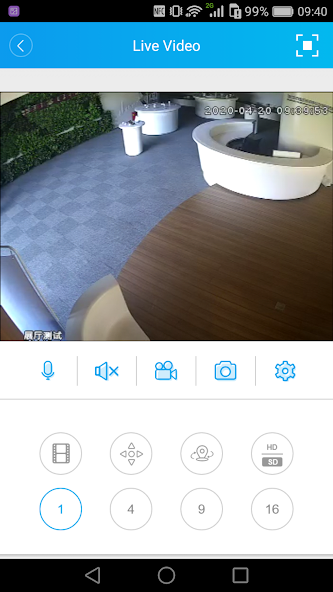
XMEye is used for the live monitoring of CCTV cameras, viewing playbacks, recording live footage directly onto mobile devices, and adjusting camera image settings—such as configuring colors and managing image quality.
With the XMEye app, users can comfortably connect their CCTV camera system to their mobile phones. This app has many great features that help users operate and control their CCTV cameras. It supports several CCTV systems but is specially designed for XMEye DVR or NVR systems. If you have cameras from the XMEye brand, this is for you. Install it on your mobile and operate your cameras from anywhere in the world through the internet.
XMEye App Info
| Feature | Details |
|---|---|
| App Name | XMEye |
| Version | 1.6.6.4 |
| Developer | Zhejiang JAIFY Co., Ltd. |
| Category | CCTV Monitoring |
| Android Required | 7.0 and up |
| Size | 64 MB |
| Updated | Apr 3, 2026 |
Note: You can also download the latest Version of XMeye for PC.
Features of XMEye App
There are many good features available in this App. Here is a list of some important features.
- Full Screen Mode: The user can view their cameras in full-screen mode by clicking the Right-upper icon.
- On-Screen Channel Name: You can see the name of a particular camera. You can also customize the name in settings.
- Capture Screen Shots: Users can capture screenshots of any camera whenever they want and see all screenshots in one place.
- Record Video on Mobile: You can start video recording with any camera. This recording will be saved in your mobile’s local storage, so you do not need to access the DVR or NVR when you need a recording.
- Video Playback: Whenever you want to access CCTV cameras’ recordings, you can do so with this application.
- Image Quality: If you have a slow internet connection, then you can reduce the image quality of live video for flawless live monitoring.
- PTZ Support: If you have a PTZ-compatible camera, then you can also operate its PTZ feature using this App.
- Number of Screens: You can set 1 camera, 4 cameras, 9 cameras, or 16 cameras to view on your mobile screen.
Purpose of XMEye APK
The primary purpose of XMEye is to bring your CCTV surveillance system right to your mobile screen. This application acts as a gateway to monitor your home, shop, office, school, hospital, factory, or any premises you wish to secure and view anytime, from anywhere.
The features explained above play a crucial role in making any CCTV system far more useful. Another key purpose of this application is to allow you to efficiently monitor multiple cameras on your mobile’s small screen and easily review playbacks whenever you need to check recordings.
Furthermore, if you have PTZ cameras, this app becomes even more essential, as it offers built-in PTZ controls to pan, tilt, and zoom the camera.
Overall, the purpose of the XMEye APK is to make CCTV surveillance more convenient, accessible, and efficient for everyday users.
You may also need this: XMeye Forgot Password
How Does XMEye Help Users?
XMEye helps users in many ways. For example, when you are away from your premises, it shows you live cameras and lets you operate them. It is very easy to use, so you don’t have to be a technical expert. It works even on slow internet, so you can easily watch from anywhere. This application can also show many cameras at the same time on your mobile screen, which makes the work much easier.
What I like most about this app is the local storage recording feature. It allows you to save footage directly onto your mobile device, meaning you don’t even need an internet connection to watch it later. More importantly, even if someone tampers with the main system or deletes the recordings from the DVR/NVR, you will still have a secure backup of the incident right on your phone.
In short, XMEye is a highly useful application that seamlessly connects supported devices to your mobile, delivering a smooth and hassle-free experience.
FAQs
Screenshots